DP Client Tool
The DP Client Tool is a dedicated application that manages the settings required for X-Ray bridging and scanning functionality. It can be installed on each required computer directly from the Patient Record by any user with the appropriate permissions. Watch DentalPlus Video

To install the tools:
- Click the X-Ray or Scanner icon in the Patient Record.

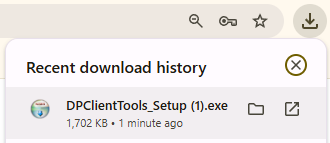
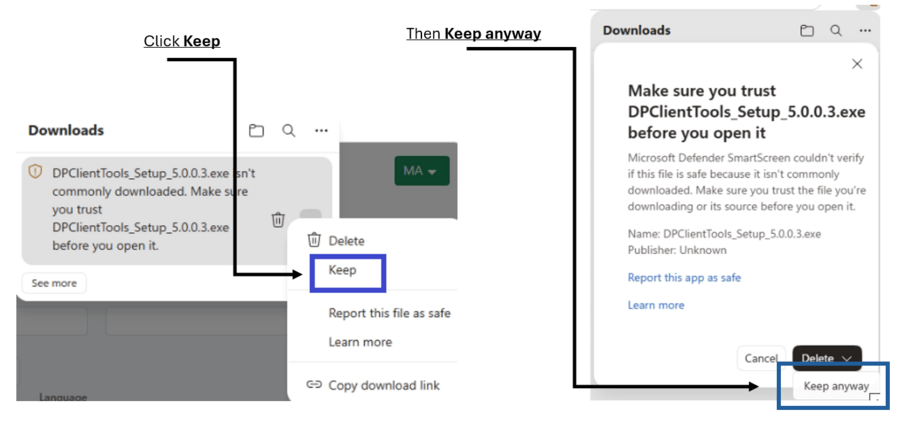
- Download the installer. If Windows Security displays a warning, select Keep anyway to continue the download.
If Windows Security displays a warning, select Keep and Keep anyway to continue the download. This warning simply means that the file is not commonly downloaded on Windows computers.
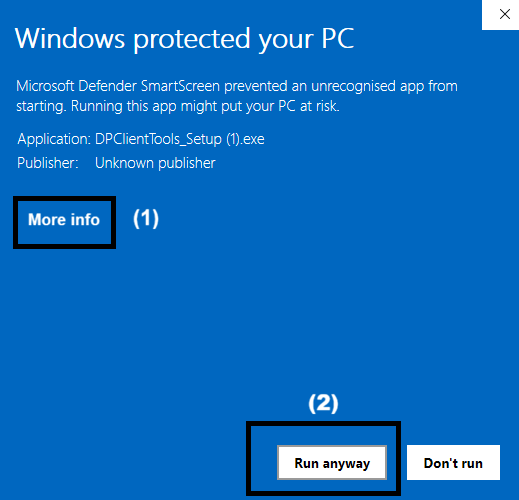
- Run DPClientTools_Setup.exe.
If Windows displays a security warning, click More info and then Run anyway. This warning appears because the DentalPlus Tool application is not widely installed worldwide.
- Once installation is complete, close and reopen your web browser.
- Click the tool icons again to launch the required functionality.
- Tick Allow the applications to open and Open link.
