Overview
Three modules : Patient Forms, Portal Requests, and Patient Portal — form the foundation of the digital patient workflow. Together, they reduce paperwork, improve document tracking, and enhance overall system efficiency.
Accessible from any device via a web browser, they provide features such as online booking, digital form signing, and convenient access to key parts of the patient record.
Patient Digital Workflow
Before a patient receives a notification with a link encouraging them to complete a task online, it must first be sent from the DentalPlus system.
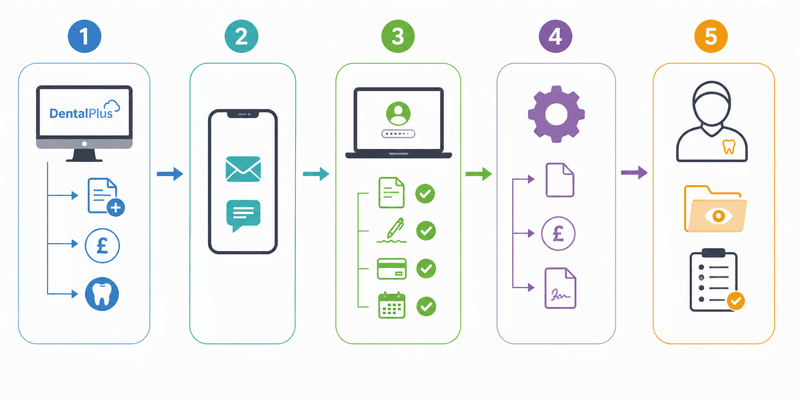
Step 1 – Request Sent
A user within the practice creates and sends a request from:
- Patient Record → Portal Requests → Send New Request (for forms)
- Patient Record → Financials -> Request Payment (for payment requests)
- Patient Record → Treatment-> Send for Signing (to send treatment plans for signature)
Step 2 – Patient Receives Link
The patient receives an SMS or email containing a secure link to the portal.
Step 3 – Completion Online
The patient logs into the Portal and:
- Completes requested forms
- Reviews and signs treatment plans
- Makes payments
- Books additional appointments
Step 4 – Automatic System Update
Once the patient submits the information, it is automatically returned to the DentalPlus system.
- Forms appear in Patient Record → Forms
- Payments are recorded in Financials
- Signed treatment plans display the patient’s signature
Step 5 – Clinician Review
If a form requires clinician review:
- The system highlights it.
- A “Forms to Review” button appears in the Patient Record -> Treatment.
- Forms awaiting review are placed in the Needs to Review folder in the Patient Record -> Forms.
- The clinician must open and review the form. The system records that the review has been completed.
This process helps practices reduce paperwork, improve communication speed, and provide a smoother digital experience for patients.