To-Do Lists
The To-Do List can help organise and manage tasks as part of daily workflow. It allows to create, manage and complete both personal and practice-wide tasks.
- Personal tasks are visible only to a user.
- Practice-wide tasks are shared with the entire team.
You can also set reminders for specific users at a chosen date and time.
Creating a Task
To create a new task:
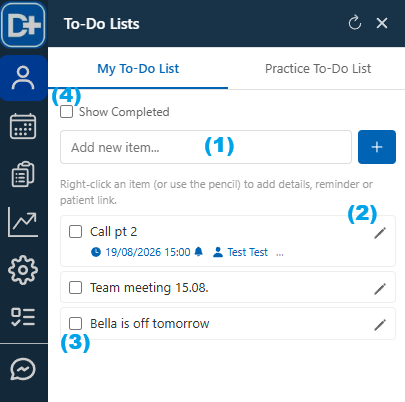
- Enter the task name.(1)
- Click + to add the task.
- The new task will appear in the To-Do List.
- Click the pen icon to add or edit the task details. (2)
- Set a reminder date and time, if required.
- Select whether a pop-up reminder should be displayed.
- Assign the task to a specific user, if required.
- Link the task to a patient record, if applicable.
- Save changes
For example, you could create a task called: Call this patient next November to discuss their treatment plan.
Linking the task to the patient's record makes it easy to access the relevant patient information when the task is due.
Completing a Task
- When a task has been completed, tick the checkbox next to it. (3)
- The task will be removed from the active To-Do List.
- To view completed tasks, click Show Completed. (4)