Claims

The Patient Claims tab provides a complete overview of all claims submitted for the NHS patient, allowing you to review, edit, and resubmit claims when required.
It also provides a simple step-by-step workflow for creating, reviewing, and submitting NHS claims directly from the patient record. Simply follow the prompts at each stage and submit the claim when you have completed the process. This is an alternative way of NHS functionality in DentalPlus which is presented in Patient Record -> Treatment -> FP17.
Creating a New FP17 Claim
To create a claim:
- Open the Patient Record.
- Check the patient's details and confirm that all information is correct.
- If the patient has an exemption, add it in the patient details and click Save. To remove an exemption, click the X button next to the exemption.
- Open the Claims section.
- Select New FP17.
Completing the Claim
Follow the claim wizard to complete the required information.
- Claim Details. Check the claim date and click Next.
- Review the patient's exemptions and confirm the information is correct.
- Select the required Band. Click Next.
- Selecting Treatments: select all treatments included in the claim. Click Next.
- Pathways and Patient Information. Choose the pathway. Click Next.
- Complete the required patient information, including: Recall interval, BPE score, Patient information
Fields marked with an asterisk (*) are mandatory. The claim cannot be submitted until all required fields are completed.
- Performer and Declarations. Select the performer, the contract, confirm all required declarations, click Submit Claim.
Editing claims

To edit and resubmit an existing claim:
- Find the claim you want to update in the claims list.
- Click the Edit icon next to the claim.
- Make the required changes.
- Click Resubmit to submit the updated claim.
Sending Claims to NHS
Submitting a claim from the patient record creates the claim but does not immediately send it to NHS.
To send claims:
- Open NHS Claims in the main menu.
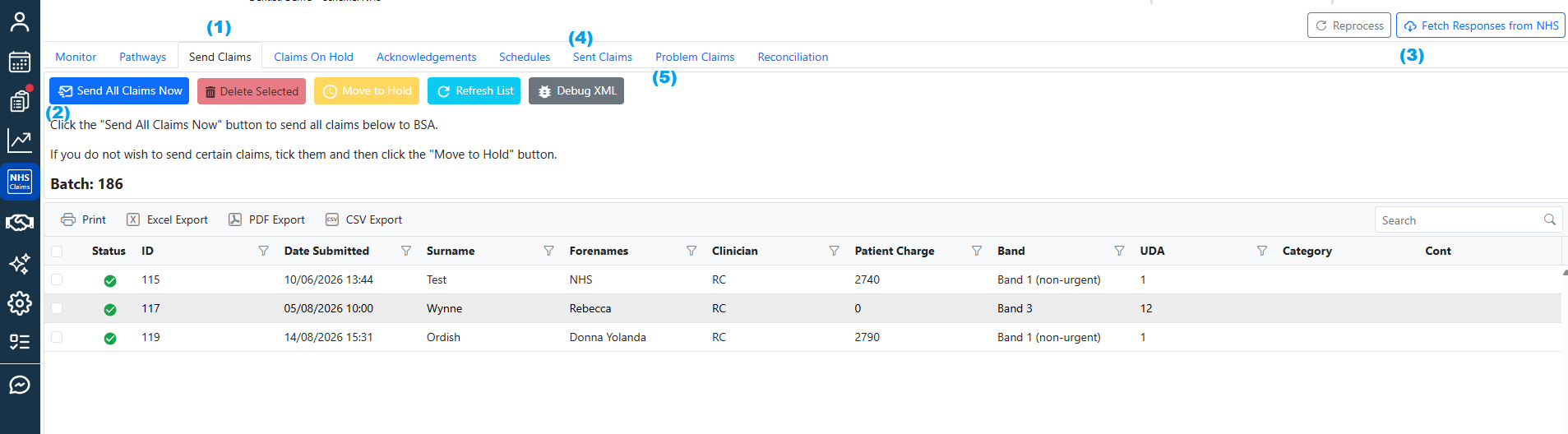
- Go to the Send Claims tab. (1)
- Review the prepared claims.
- Select Send All Claims Now.(2)
The claims will then be sent to NHS for processing.
Checking for responses
Check for responses from the NHS by clicking Fetch Responses from NHS under NHS Claims section in the main left menu. (3)
Sent Claims
All sent claims are grouped into batches.
- Open the Sent Claims tab (4)
- Find the relevant batch on the left
- Check the claim statuses.
- If a claim has a response, click the arrow on the left to expand the comments and view the details.
Problem Claims
If you see an Error status, identify and correct the reason for the error, which is often related to the patient’s details. Then:
- Open the
Patient record -> Claims. - Edit the existing claim.
- Make the required corrections.
- Resubmit the claim. You can find all problem claims under the Problem claims tab (5).