Online Booking
The Online Booking System in DentalPlus is part of the Patient Portal, a modern feature that allows patients to schedule appointments at any time and from any location.
Dental practices can provide patients with access to Online Booking through a variety of channels, including:
- The practice website
- Appointment reminder communications
- Marketing and bulk email campaigns
- Direct booking links shared by the practice
This flexibility allows patients to book appointments whenever it is convenient for them, using the communication channel that best suits their needs.
Online booking for Patients
From the patient's perspective, Online Booking is a simple web link. When the patient clicks the link, they are presented with the available appointment options and guided through the booking process.
The patient can select the required site, appointment type, choose a suitable date and time, and complete the booking online. Once confirmed, the appointment is automatically added to the practice diary and a confirmation email is sent to the patient.
Existing patients also have the option to sign in the Patient Portal and continue the booking process there. By logging into the Patient Portal, patients can manage their appointments, view upcoming bookings, and access other online services provided by the practice.
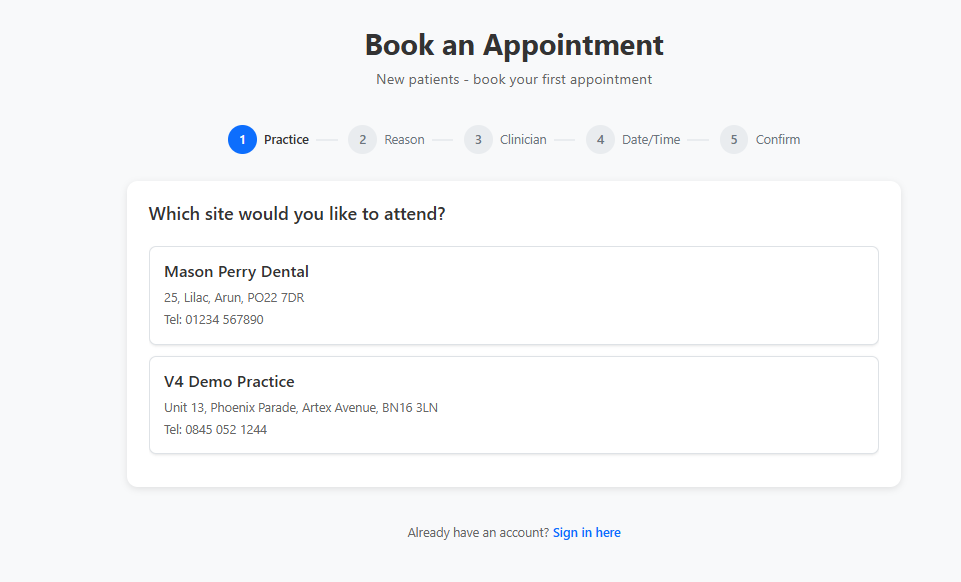
How to book an appointment
Booking an appointment online is a simple process:
- Select the practice site you wish to attend.
- Choose the reason for your visit.
- Select your preferred clinician (if available).
- Choose a suitable appointment date and time.
- Pay a deposit if required.
- Enter your personal details and contact information.
- Review the appointment details and click Confirm Appointment.
Once the booking is confirmed, the appointment is automatically added to the practice diary and a confirmation email is sent to the patient.
Registered patients can also book appointments using this booking screen without signing in to the Patient Portal. The system will recognise existing patients by matching their first name, surname, and date of birth with the information stored in the practice database.