Overview
Three modules : Patient Forms, Portal Requests, and Patient Portal — form the foundation of the digital patient workflow. Together, they reduce paperwork, improve document tracking, and enhance overall system efficiency.
Accessible from any device via a web browser, they provide features such as online booking, digital form signing, and convenient access to key parts of the patient record.
All existing patients can access the Patient Portal using the email address registered in DentalPlus.
New patients can register for the Patient Portal first and then use their registration details to log in.
Patient Digital Workflow
Before a patient receives a notification with a link encouraging them to complete a task online, it must first be sent from the DentalPlus system.
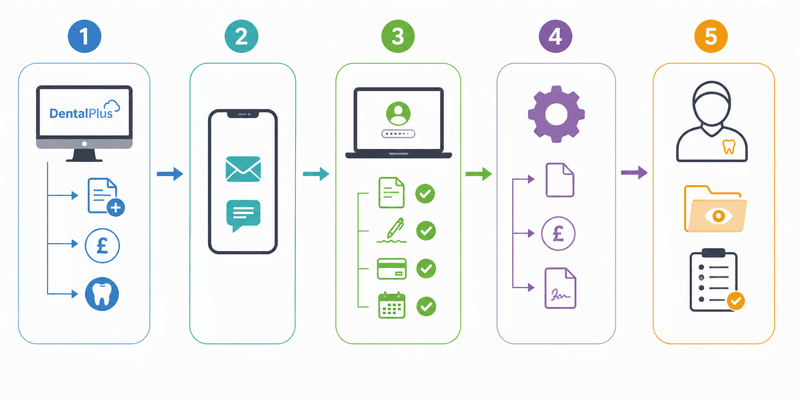
Step 1 – Request Sent
A user within the practice creates and sends a request from:
- Patient Record → Portal Requests → Send New Request (for forms)
- Patient Record → Financials -> Request Payment (for payment requests)
- Patient Record → Treatment-> Send for Signing (to send treatment plans for signature)
Step 2 – Patient Receives Link
The patient receives an SMS or email containing a secure link to the portal.
Step 3 – Completion Online
The patient logs into the Portal and:
- Completes requested forms
- Reviews and signs treatment plans
- Makes payments
- Books additional appointments
Step 4 – Automatic System Update
Once the patient submits the information, it is automatically returned to the DentalPlus system.
- Forms appear in Patient Record → Forms
- Payments are recorded in Financials
- Signed treatment plans display the patient’s signature
Step 5 – Clinician Review
If a form requires clinician review:
- The system highlights it.
- A “Forms to Review” button appears in the Patient Record -> Treatment.
- Forms awaiting review are placed in the Needs to Review folder in the Patient Record -> Forms.
- The clinician must open and review the form. The system records that the review has been completed.
This process helps practices reduce paperwork, improve communication speed, and provide a smoother digital experience for patients.