Hardware Requirements
DentalPlus is a cloud-hosted, web-based software solution. This means that all core data is securely stored on cloud servers, while users access the system through their Windows or macOS computers—or any Android or iOS devices—using the web browser (usually the latest version of Google Chrome ).
No installation is required. Simply add a user and access your system from any location using the web link.
Specification for a Workstation
- Windows or macOS system
- Web-Browser - Google Chrome (latest version)
- CPU - Intel i5 or equivalent or higher
- Minimum 8 GB RAM (16GB Recommended)
- Minimum 500 GB hard drive
- Minimum monitor resolution - 1920 x 1080
Specification for Internet Connection
Since all operations are performed in the cloud, a high-speed and stable broadband connection is essential for optimal performance.
- Download Speeds: 20+ Mbps
- Upload Speeds: 15+ Mbps
Internet Connectivity
For any cloud-based system a stable internet connection is required for normal operation. We recommend to have a backup internet solution in place to minimise disruption in the event of a broadband outage.
Common options include:
- A 4G or 5G mobile broadband dongle.
- A mobile hotspot created from a smartphone.
- A dedicated backup broadband service from a different provider.
- A business-grade router with automatic failover to a mobile data connection.
These solutions can help ensure continued access to online services and reduce downtime should the primary internet connection become unavailable.
Recommendations for a tablet
For digital signatures only, we recommend the Amazon Fire 10 tablet due to its regular updates, reliability, and competitive pricing. Please contact DentalPlus before making a purchase if you would like to discuss alternative options.
Once the tablet is set up, simply download the DentalPlus Remote Forms v4 and use the QR code to connect the tablet to the DentalPlus system.
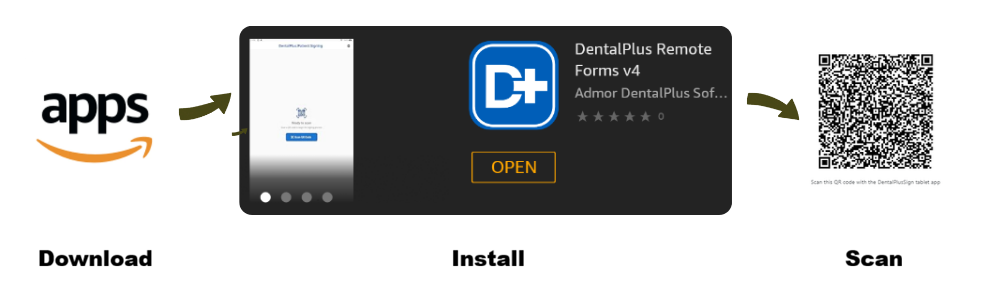
How to Install the Digital Signature App
- Tap the Appstore icon on the tablet’s Home screen.
- Search for
dentalplus - Install DentalPlus Remote Forms v4.
- Open the application and allow access to the tablet camera.
- Use the app to scan the QR code displayed on the monitor and start the digital signing process.